


- Run your own project all the way through
- Sync, with every placement measured against the audio
- Footage never leaves your Mac: sync, transcription, B-roll and the scripted path run there
- Full analysis on either path. See what it finds
- No card required
macOS · Apple Silicon
Drop the footage.Get to the edit.
Multicam synced. Interviews transcribed. B-roll sorted. On your Mac.Rushes strings it out first: interviews by theme, B-roll by what's in the shot, the circled takes in a row.
Rushes strings it out first: interviews by theme, B-roll by what's in the shot, the circled takes in a row. Rushes is a Mac app that syncs, verifies, transcribes, and organizes talking-head footage, from documentary and corporate interviews to scripted spots, sorts the B-roll that comes with it, and hands your NLE a project that is ready to edit.
Rushes is a Mac app that syncs, verifies, and organizes talking-head footage, sorts the B-roll, and hands your NLE a project that is ready to edit.
Download for macOS
The link is on its way.
Open the email on your Mac to download Rushes.
Free to try · $20.75 a month, billed yearly at $249 · No card required
Free to try · $20.75 a month, billed yearly at $249 · No card required
Your NLE
Premiere ProFinal Cut ProDaVinci Resolve
Each gets its own export, with bins, sequences, and markers.
Your Mac
Apple siliconM1 or latermacOS 13 or later
Price
$20.75a month
Billed yearly at $249. The founding rate is locked in for as long as you stay subscribed. Cancel anytime. Standard rate $399 a year.
Free to tryNo card required
“Rushes exists because the tool didn’t.”
Pete Capó, a commercial director and editor
How it works
Organized at ingest.Every file grouped, synced, and checked.
Analyzed as interviews.Your brief, questions and themes in. A stringout for each one out.
Analyzed as a script.The supervisor's folder in. Every take by slate, every circle honored.
Ready to edit.Your NLE opens a project: bins built, timelines named and sorted.
Cameras, a recorder, a phone, two shooting days on one drive. Rushes groups it by subject and by day, syncs it, and measures every placement against the audio. B-roll is set aside by its sound. You never pick a method.
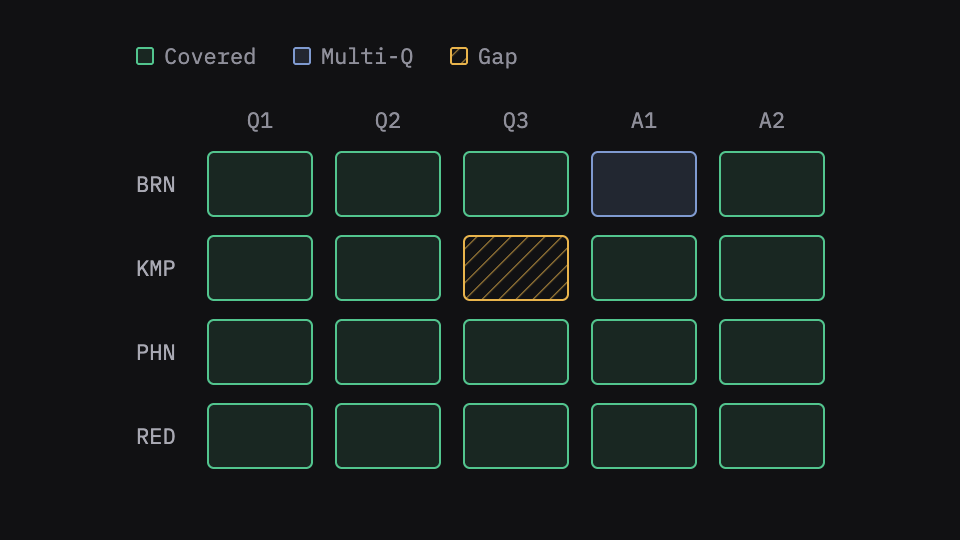
Add a brief, your questions, the themes you're after, or nothing. Rushes gathers what every subject said on each one and files what it found on its own under Discovered. The soundbites are suggestions, and every interview is still there whole in its sync timeline. The order stays yours.
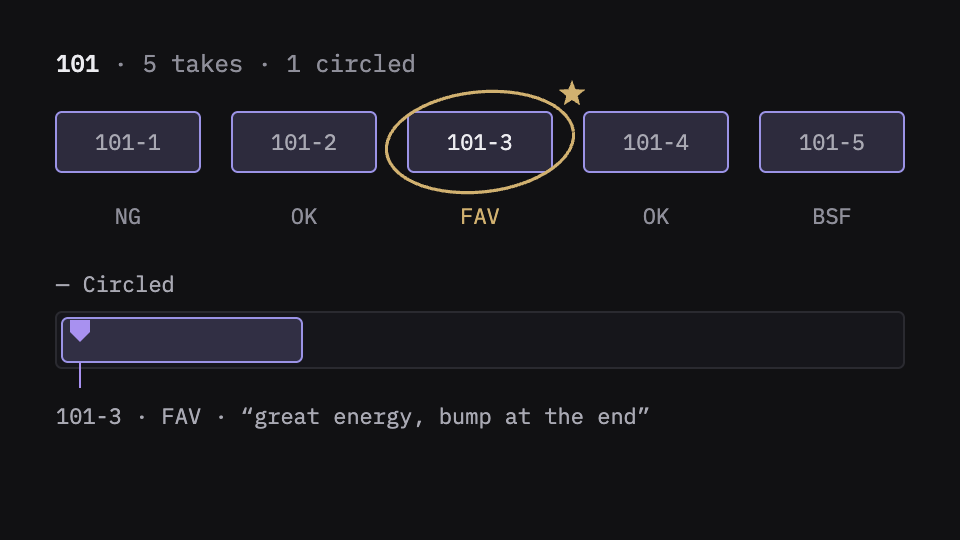
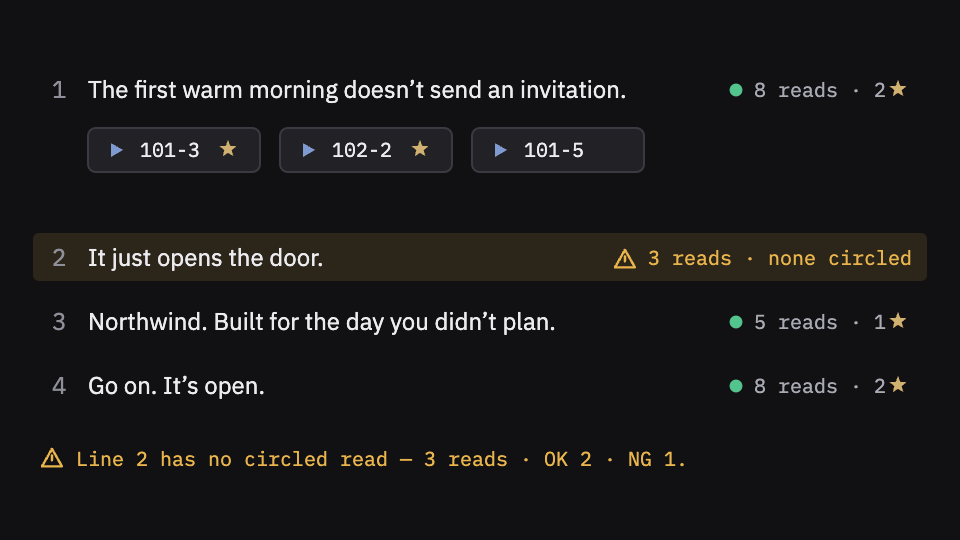
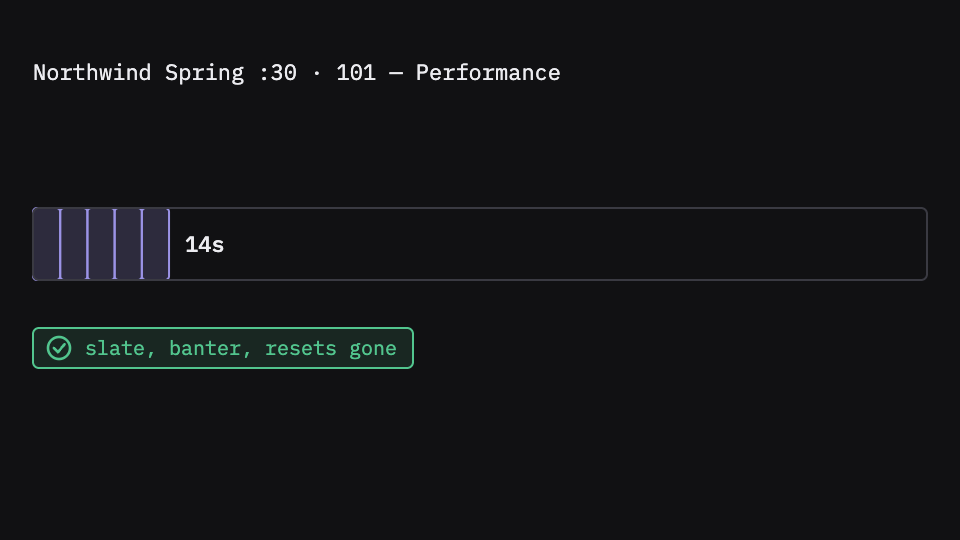
Editor log, lined script, exports. Rushes finds every take by slate, honors the circled reads, builds the script report, and cuts the reads to the words.
Sync timelines, selects, soundbites and transcript markers for Premiere Pro, Final Cut Pro and DaVinci Resolve. The session starts at the creative part.
Screens from a sample project: the sources grouped at ingest, the interview analysis by concept, the script report, and a generic NLE filling with the bins and timelines.
Rushes does the laundry.
The story is still yours.
The link is on its way.
Open the email on your Mac to download Rushes.
Analysis
Interview
Every answer, gathered by theme.
Your questions and themes, or none. You keep or cut what it gathers.


Scripted
Rushes honors every circle.
Give it the script and the supervisor's folder.
The client's on the couch. You know where everything is.
B-roll
Filed by what is in the shot.
Set aside by its sound, sorted and named from the picture, all on your Mac.


For editors who still
watch everything.
Rushes strings it out first: interviews by theme, B-roll by what's in the shot, the circled takes in a row. It all opens in Premiere Pro, Final Cut Pro, or DaVinci Resolve.
Premiere Pro · Final Cut Pro · DaVinci Resolve · one-click Open in Resolve needs Resolve Studio
R3D · BRAW · ProRes RAW · Sony X-OCN¹ · Broadcast WAV · LTC on audio · macOS 13 or later · Apple Silicon
Rushes checks its work.
Your NLE doesn't.
Shot with multiple cameras or a separate recorder? Everything downstream rests on the sync. So before anything else happens, Rushes measures every placement against the audio, and when the clock is wrong, the audio wins.
Catch the sync error before the mix does.
Placed by timecode, then measured against the audio. When the clock is two frames off, Rushes moves the clip and says so.
Hear a two-frame error.
Split the reference and the clip left and right and a sync error sounds like an echo. Nudge it live until it disappears.
Your attention goes straight to what needs it.
A yellow flag means Rushes has actual doubt, and it lands on the one file that needs your ear. Everything it can stand behind stays calm, so you only check the sync on the clips it flagged.
See the sync, not just the numbers.
Every camera rolls live on one clock, a meter on every tile, so a drifting angle shows itself. Click a camera and you are adjusting it at that timecode.
Find your bad day
on this list.
Every shoot goes through the same pipeline. The messy ones aren't left behind.
-
The classic. Placed by timecode, then verified against the audio anyway.
-
If a camera's only timecode is LTC on an audio track, Rushes finds it, decodes it, and keeps that channel out of playback and export.
-
Two clocks seven minutes apart still land in sync. Rushes measures the skew and widens the match window to cover it.
-
No timecode? Rushes matches the waveforms. The phone clip lands where its sound says it belongs.
-
Placed by timecode, and flagged as unverifiable rather than silently trusted.
-
The scratch track is used as evidence even though it will never be heard in the edit.
-
A take that spans a file break stays one take. A recorder's continued rolls become one lane, not a pile of new ones.
-
R3D, BRAW, ProRes RAW and Sony X-OCN are read natively, including multi-segment R3D clips as the single take they are. Nothing to transcode first.¹
-
Sound Devices, Zaxcom: sample-accurate timecode read straight from the file's time reference.
-
Two shooting days on one drive split by day, with a readout of where the dates actually came from, because transcodes and copies rewrite them.
-
When nothing lines up, Rushes never invents a placement. Clips it can't match stay out of the export, flagged for you to place from the camera file.
¹ Sony X-OCN syncs natively. Pictures and playback through the free nablet extension on macOS 15.6 or later.
Your footage never
leaves your Mac.
Everything that touches your picture and sound happens here: the sync and its check against the audio, transcription, the B-roll sort, and the whole scripted path, analysis included. An interview project sends only text (the transcript, the subject labels, and the brief, questions and themes you typed), and only when you click Run. No API keys to wire up. Analysis is included.
What leaves, in writing: the privacy policy.
The link is on its way.
Open the email on your Mac to download Rushes.
Built for editors who cut people talking.
Documentary, corporate and branded interviews, and scripted commercial spots. If the footage is people talking to camera, Rushes preps it for the edit.
Documentary
The director-editor without an AE.
You shot it, now you cut it. Rushes is the assistant you don't have.
CorporateThe freelancer who inherits the drive.
Half the job is finding out what you were handed. Rushes does that half.
CommercialThe editor cutting from a supervisor's folder.
Every take by slate and every circle honored before you open a bin.
AE · DITThe assistant who preps the drive.
Hand over a verified, sorted project and keep the judgment calls.
Free to try.
Pay when you export.
Run your own project all the way through and see what Rushes finds. You pay when you want it in your NLE.
- Everything above, plus export
- Premiere Pro, Final Cut Pro, and DaVinci Resolve
- Sync timelines, selects, stringouts, and the report
- Unlimited projects
- A year of updates. Standard rate $399/year
Download for macOS
Cancel anytime.
Stop prepping.
Start cutting.
The link is on its way.
Open the email on your Mac to download Rushes.
Not downloading yet? Get product updates and release notes.
Unsubscribe any time. See our Privacy Policy.Questions.
A Mac app for editors who cut people talking: documentary, corporate and branded interviews, and scripted commercial spots. Rushes syncs, verifies, transcribes, and organizes talking-head footage, interview or scripted, sorts the B-roll that comes with it, and hands Premiere Pro, Final Cut Pro, or DaVinci Resolve a project that is ready to edit. Your footage never leaves your Mac.
No. Rushes is made by Beastly, Inc. and has no connection to Adobe or Premiere Rush. Rushes doesn’t edit: it prepares talking-head footage and hands it to Premiere Pro, Final Cut Pro, or DaVinci Resolve, where you cut.
Grouping your footage by interview or by scene uses no AI, and neither does sync: it is measured, and every placement is checked against the audio.
Transcription and the B-roll sort use AI models that run on your Mac, downloaded once, much like the transcription built into your NLE.
The interview analysis is the one step that uses a language model in the cloud. When you click Run, it reads the transcript text and sorts what was said into themes, coverage and soundbites. Scripted projects send none of it. We are working toward running this step on your Mac as well.
Rushes never picks the best take or decides what follows what, and the order stays yours. It all arrives strung out, ready for you to watch and find the story. The guide: how to use AI in video editing without handing it the edit.
No. Your audio and video never leave your Mac. The sync and its check against the audio, transcription, the B-roll sort and the scripted analysis all run on your Mac. An interview project sends only text: the transcript, and the subject labels, brief, questions and themes you typed, when you click Run. No frames, no audio, no file names, no media of any kind. Scripted projects send none of it.
Trying it is free. Exporting is what you pay for. Download Rushes and run your own project all the way through: drop the drive, sync and verify every angle, transcribe locally, run the analysis on either path, with no card required. See what it finds on your footage. When you want the project in your NLE, you subscribe: $20.75 a month, billed yearly at $249 at the founding rate (locked in for as long as you stay subscribed), unlimited projects, all three NLEs.
Not to sync or transcribe. Those run on your Mac with no sign-in, even offline. On an interview project, Rushes asks for your email the first time you run the analysis and sends you a sign-in link. A scripted project never asks: its analysis runs on your Mac. No password, no card, and nothing to pay until you export.
NLEs place clips by timecode and never check their work. Rushes measures every placement against the audio, and when the clock is wrong the audio wins. It tells you how many frames it moved, flags the clips it has actual doubt about, and gives you a listen tool where a two-frame error is audible as slap. And the shoots your NLE can't sync at all, LTC on an audio track, a recorder minutes off the clock, a camera with no timecode, go through the same pipeline. The guide: how to sync cameras with no timecode.
No, and it won't pretend to. Rushes measures placement, not speed. If a clip's clock and its audio disagree, it tells you by how much and flags it. It never changes a clip's speed.
Yes. Drop the script supervisor's folder with the footage: the editor log, the lined script, the exports. Rushes finds every take by slate, honors the circles, builds the script report, and cuts the reads to the words. Interview or scripted, it has to be people talking to camera. The guide: how to bring a script supervisor’s circled takes into your NLE.
Word, plain text, or Markdown. A .docx, .doc, .txt, or .md file. From Google Docs, use File → Download → Microsoft Word.
Rushes reads three kinds of script. A two-column AV script, where it finds the spoken column whatever it's called (AUDIO, VO, SOUND, COPY, DIALOGUE) and whichever side it's on. A simple document, with a heading per spot and the lines as paragraphs. And a ScriptE delivery: drop the whole folder, and Rushes reads the lined script, the editor log with its NG, OK, BSF, and FAV grades, and the SilverStack log for circled takes and timecode.
Rushes reads English scripts. Final Draft, Fountain, RTF, Pages, and a PDF script on its own aren't supported yet, and screenplay format isn't specifically supported.
Rushes sorts it. Drop it in with everything else. Rushes sets it aside by its sound, sorts it on your Mac into bins named from the picture, and files every bin with a stringout. After an interview analysis, it suggests the B-roll that looks like what each concept says. Where B-roll goes in the cut stays yours.
Premiere Pro, Final Cut Pro, and DaVinci Resolve. Each gets its own export, with bins, sequences, and markers structured for how that NLE imports them. Every export also includes a Broadcast WAV per channel and a plain-text report. The one-click Open in Resolve, which builds the bins and imports every timeline for you, needs Resolve Studio.
The everyday formats, and camera RAW without a transcode. MOV, MP4, MXF, M4V, AVI, MKV, MPG, TS, and AVCHD (MTS and M2TS).
RED R3D reads natively, multi-part clips and sidecar audio included, and so does Blackmagic RAW. Sony X-OCN from VENICE and BURANO syncs with its sound and timecode as it is; to see the picture, install the free nablet X-OCN Media Extension (macOS 15.6 or later). Apple ProRes RAW and RAW HQ read, sync, and transcribe, but don't play back in Rushes yet. ARRIRAW, Phantom CINE, and CinemaDNG aren't supported: transcode them to ProRes first.
Sound comes in as WAV and Broadcast WAV, AIFF, MP3, AAC, FLAC, OGG, or WMA. From recorder files, Rushes reads the timecode, scene, take, and track names.
Rushes is built and tested for English. Other languages transcribe (Spanish has been tested), but the fine trimming of clip edges that English gets is not yet there for them. Full support for Spanish, then more languages, is coming in future updates.
No, annual only. Rushes bundles the cost of analysis into the subscription, and an annual term is what keeps that sustainable at one predictable price without metering your projects.
One subscription, one Mac at a time. Moving to a new Mac? Sign out on the old one first, or use Migration Assistant.
You can cancel anytime, yourself, from the subscription portal, where you can also update your payment method and download past invoices. Cancelling stops the next renewal, and your access continues through the end of the period you've already paid for. Everything you've already exported stays yours.
No. Rushes is a direct download, a signed, notarized DMG. Subscriptions are handled through Stripe, which completes in your browser and acts as merchant of record. Distributing outside the App Store is what lets Rushes reach into your local filesystem and drive your NLE the way the workflow requires.
Rushes requires macOS 13 or later on Apple Silicon (M1 or newer). Intel Macs are not supported. A one-hour interview typically transcribes in minutes.
It replaces the mechanical part: sync, transcription, sorting. Story structure, sequence order, and what makes the cut stay yours. If you work with an AE, Rushes handles the prep so they can focus on the judgment calls that matter. The guide: how to prep your footage like an assistant editor.
Yes. Every update opens every project you've ever made.
Rushes was built by Pete Capó, a commercial director and editor with years of experience cutting documentary and high-end branded content. Every workflow decision was made by someone who has sat at a timeline with a deadline. Rushes exists because the tool didn't.
Rushes is Mac only; there is no Windows version. macOS 13 or later and an Apple Silicon Mac (M1 or newer). 8 GB RAM minimum, 16 GB recommended. About 3 GB on disk, including the models Rushes downloads the first time it opens. An internet connection is needed to run the analysis and to confirm your subscription; export keeps working offline for up to 14 days between check-ins. Sync and transcription run fully offline.
How Rushes compares.
Pricing and features verified from each company's public website, October 2026. Each tool in plain words.
| Feature | RushesSync, verification, transcription, and organization for talking-head footage | Eddie AIAI rough cut assistant | SelectsAI pre-edit tool for podcasts and long-form | WideframeAI assistant editor for Premiere Pro | DescriptTranscript-based text editor for video |
|---|---|---|---|---|---|
| Price per year | $2497 | $239 + credits10 | $192 – $96011 | $1,20012 | $2885 |
| Footage to cloud | Never | Partial1 | Partial2 | Never | Always |
| Timecode measured against the audio | ✓ | ✗ | ✗ | ✗14 | ✗ |
| Multi-track field audio at ingest | ✓ | ✗13 | ✓15 | ✗ | ✗6 |
| NLE export | Fc · Pr · Dr | Fc · Pr · Dr3 | Fc · Pr · Dr | Pr | Fc · Pr · Dr6 |
| One-click multi-sequence Resolve Studio import | ✓ | ✗3 | Partial4 | ✗ | ✗ |
| Concept cards and coverage across subjects | ✓ | ✗9 | ✗ | ✗ | ✗ |
| Reads the script supervisor's documents | ✓16 | ✗ | ✗ | ✗ | ✗ |
| Sony X-OCN native, no transcode for analysis | ✓17 | ✗17 | ✗17 | Not stated17 | ✗17 |
| Footage caps | None | Metered10 | 10 – 40 hrs/mo11 | None | 30 hrs/mo5 |
| B-roll sorted into bins named from the picture, on the Mac | ✓8 | Partial18 | ✗ | Partial19 | ✗ |
| AI makes editorial decisions | Never | Yes | Yes | Yes | Yes |
Notes and sources
- 1Eddie keeps your original camera files on your drive, but the desktop app transcodes and uploads a lighter copy of every clip for analysis; Eddie's privacy policy names AWS, Google and Microsoft among its processors. Night Shift's text-a-link workflow processes footage from Frame.io, Google Drive or Dropbox without a local download. An on-prem option is enterprise-only.
- 2Selects runs as a desktop app; its privacy policy names Google Cloud and AWS as service providers. Footage-processing locality is not publicly specified.
- 3Eddie exports one edit per export ("Each export delivers one edit. There is no button that exports every edit in one file"), at 100 credits each. Since v4 (September 2026) the export is a native .prproj or .drp with the multicam group and bins in place, but a project with several stringouts still takes several exports and several imports.
- 4Selects hands off to Resolve as a .drp project file imported through Resolve's Project Manager, carrying the drafts you choose plus edit points, track layout and speaker labels; effects, levels and graphics do not transfer. Rushes opens a new Resolve Studio project and imports every sync timeline and stringout in a single click.
- 5Descript Creator plan, billed annually at $24/month ($288/year). Includes 30 hours/month of media transcription; each camera angle on a multi-camera shoot counts as a separate file against this limit. Business plan is $50/month ($600/year) with 40 media hours/month.
- 6Descript's timeline export delivers a single flat composition as XML (Premiere Pro or DaVinci Resolve), FCPXML (Final Cut Pro), EDL, SESX or AAF, with a folder of media copies, not an organized project with bins, sync timelines and stringouts. Transitions, titles and effects do not export. Files with three or more audio channels are downmixed to stereo on import.
- 7Rushes founding rate of $249/year is available to anyone who subscribes while the founding window is open, and holds for as long as the subscription remains active and uninterrupted. Standard rate is $399/year.
- 8Rushes sets B-roll apart from the talking-head footage by its sound and timecode, sorts it on the Mac into bins it names in plain English from what is in the shots, and files a stringout for every bin. After an interview analysis it suggests the B-roll that looks like what each concept says. No frame, thumbnail or description leaves the Mac.
- 9Eddie compiles soundbites into an arc on request through chat. It does not produce the standing structure, concept cards, coverage map and per-subject gaps, that exists before any prompt is typed.
- 10Eddie Plus, $239/year for 3,000 credits a month. Eddie also sells one-time credit packs ($10 per 1,000 credits; no subscription) and Eddie Max at $1,999/year for 30,000 credits a month. Importing costs about 250 credits per hour of footage and each NLE export costs 100 credits, so a 10-hour interview project with five exports is roughly 3,000 credits. Projects are capped at 100 hours.
- 11Selects Starter is $16/month billed yearly ($192/year) with 10 hours of footage analysis per month. Pro is $80/month billed yearly ($960/year) with 40 hours; Pro Max (100 hours) and Team ($800/month yearly, 200 hours, 5+ seats) sit above.
- 12Wideframe is priced at $100/month, month-to-month; annualized for comparison. No annual discount published. Wideframe states pricing may change after its beta period.
- 13Rushes reads multi-track audio from field recorders during sync, before any clip reaches the NLE. Eddie announced multi-track audio support in January 2026 as a beta that runs through its Premiere Pro and DaVinci Resolve helper extensions at the edit stage; Eddie's current documentation treats a separate sound recorder as an additional angle at import and does not describe polyphonic field-recorder files.
- 14Wideframe's sync skill matches by waveform, reports a confidence, and places low-confidence pairs by timecode with a marker, on demand. Rushes measures every placement against the audio as part of ingest, including the clips that already had timecode, and when the two disagree the audio wins.
- 15Selects states "multicam + multitrack audio, synced automatically" for separate lav and boom recordings. Polyphonic multi-track files from a field recorder are not described.
- 16Rushes reads the script supervisor's editor log, lined script and SilverStack export, finds every take by slate, and honors the circled takes. Eddie and Selects accept a plain script or outline; none of the four describes lined scripts, slates or circled takes.
- 17Rushes reads R3D, BRAW, ProRes RAW and Sony X-OCN natively at ingest, with no transcode for sync or analysis (X-OCN picture playback uses the free nablet extension on macOS 15.6 or later). Eddie decodes BRAW natively, R3D only with REDCINE-X installed, needs a proxy for X-OCN, and uploads a transcoded copy for analysis. Selects skips R3D and requires proxies. Wideframe says "major RAW formats" and names none. Descript accepts H.264, HEVC, VP8, VP9 and ProRes.
- 18Eddie sorts B-roll into topic groups it names and delivers them as bins (keywords in Final Cut Pro), but the analysis runs in Eddie's cloud: the desktop app uploads "a light copy of each video for playback and analysis." An on-prem option in your own cloud account is for enterprise customers.
- 19Wideframe analyzes footage on the Mac, and its organize-bins skill files every clip into Premiere Pro bins in the structure and naming you define (by default shoot day, camera or shot type), not names taken from the picture. Premiere Pro only.
Sources ·
Eddie pricing ·
Eddie subscriptions ·
Eddie credits ·
Eddie uploads ·
Eddie B-roll ·
Eddie multicam ·
Eddie exports ·
Eddie RAW ·
Selects pricing ·
Selects features ·
Selects privacy ·
Selects Resolve export ·
Selects proxies ·
Wideframe ·
Wideframe sync ·
Wideframe bins ·
Descript pricing ·
Descript timeline exports ·
Descript file types