New · macOS · Apple Silicon

Drop your footage.
Get to the edit.

Rushes analyzes your interviews and organizes every answer by concept — then exports a ready-to-cut project to Final Cut Pro, DaVinci Resolve, or Premiere Pro.

Early subscribers lock in $249/year — $150 off the eventual standard rate of $399.
Rushes Ingest tab — multi-camera sync

The interview is done. Now you have a folder full of files — multiple cameras, a separate audio recorder, hours of talking-head footage. Before you can cut a single frame, all of it has to be synced, organized, and actually understood. And until someone reads every word and maps who said what, you don't even know what you have.

That work used to mean an assistant editor, or a week of rewatching on your own. Rushes does it in the time it takes to make coffee — and surfaces the hero quotes, the threads connecting subjects, and the answers to every question you asked.

How it works

Three phases.
One ready-to-cut project.

Reel Watch
01
INGEST

Drop your files.
Rushes syncs and organizes your footage.

Drop your interview files — every camera, every audio file, every sequential clip. Rushes groups files by interview subject and syncs everything automatically. It reads embedded timecode when present and uses waveform analysis when there isn't any — a jam-synced multicam with a field recorder, or an iPhone with a separate voice memo, both work. Rushes reports which method it used and its confidence on every clip, and nothing advances until the sync is verified.

  • Adaptive sync — timecode when present, waveform when not, verified before analysis runs
  • Auto-grouping by interview subject
  • Multi-track audio detection and track selection
  • Sync confidence reporting and manual review flags
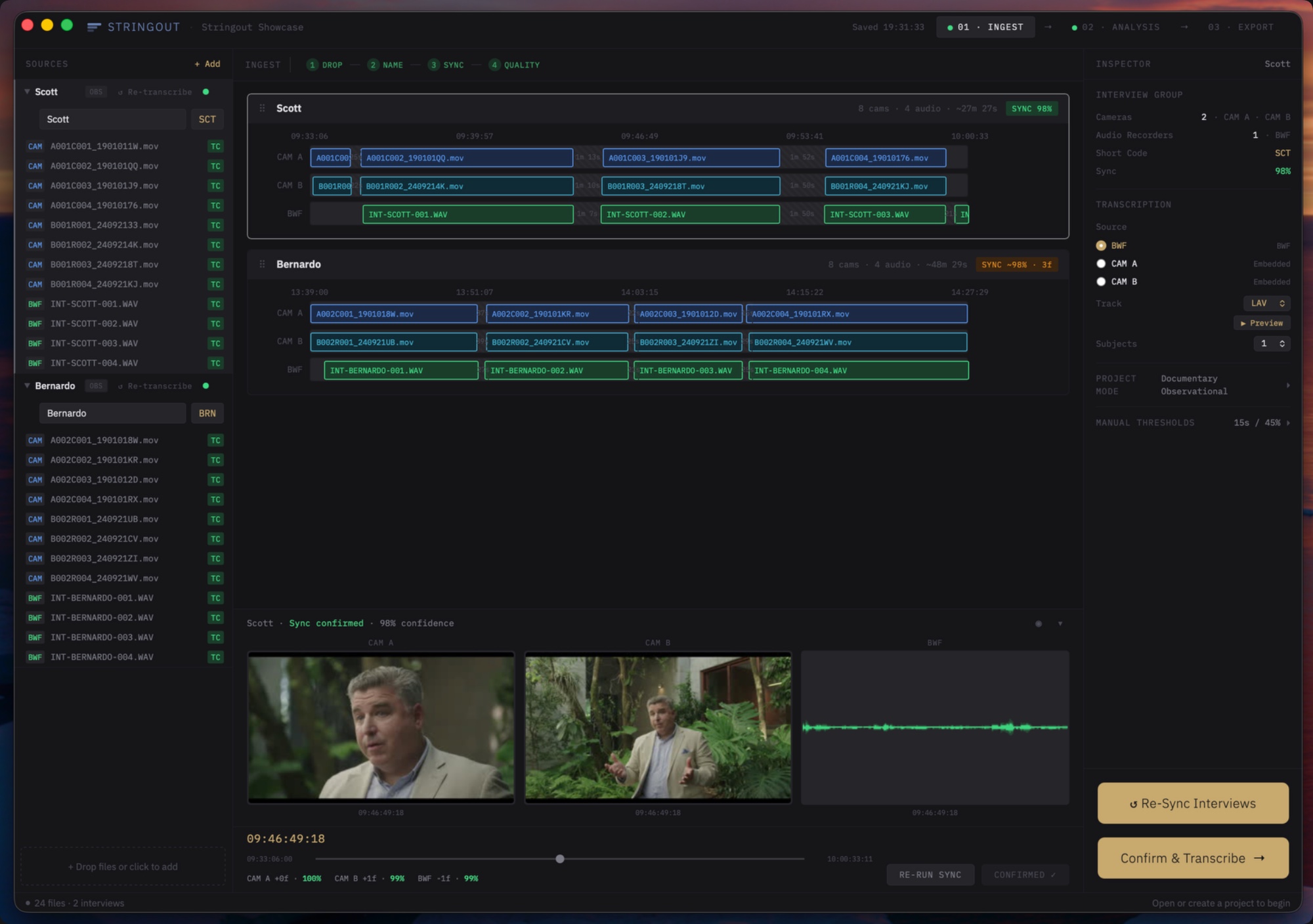
Ingest tab — timeline map with sync confidence indicators
02
ANALYSIS

The story, surfaced
before you hit play.

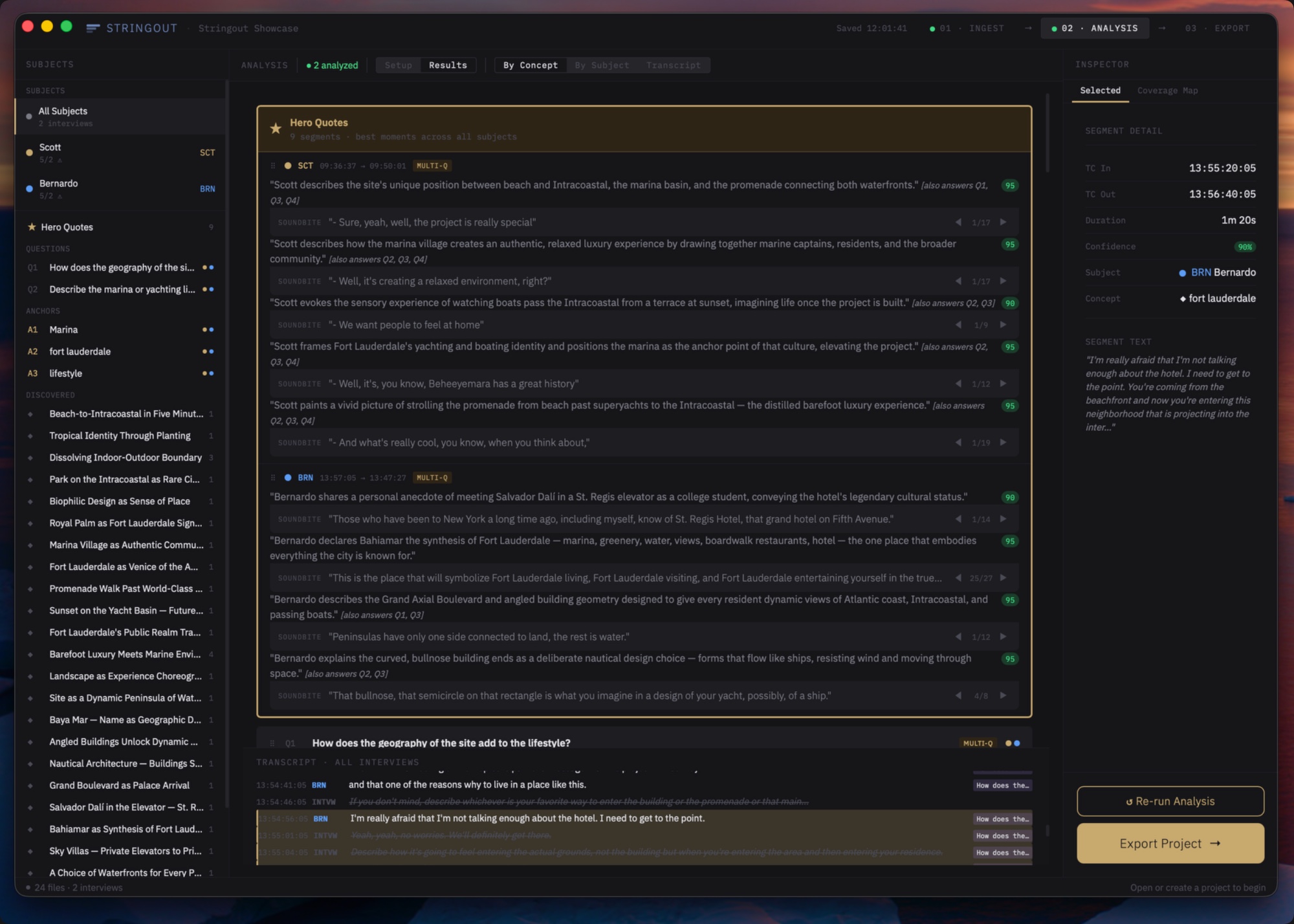
Feed Rushes your interview questions in setup, and it finds the answers — every subject who addressed each one, grouped together. On top of that: hero quotes, contradictions, unexpected discoveries, threads carrying across interviews. What took a week of rewatching now shows up before your first cup of coffee, organized and ready to cut.

  • Hero quotes flagged with reasoning — why this line carries
  • Discoveries: unprompted moments you'd have otherwise missed
  • Threads that connect answers across multiple interviews
  • Questions mapped to answers — every subject who addressed each one, grouped together
  • Brief-driven or open analysis — your call
Analysis tab — concept card grid with coverage map
03
EXPORT

Open your NLE.
Everything is synced, labeled, and ready.

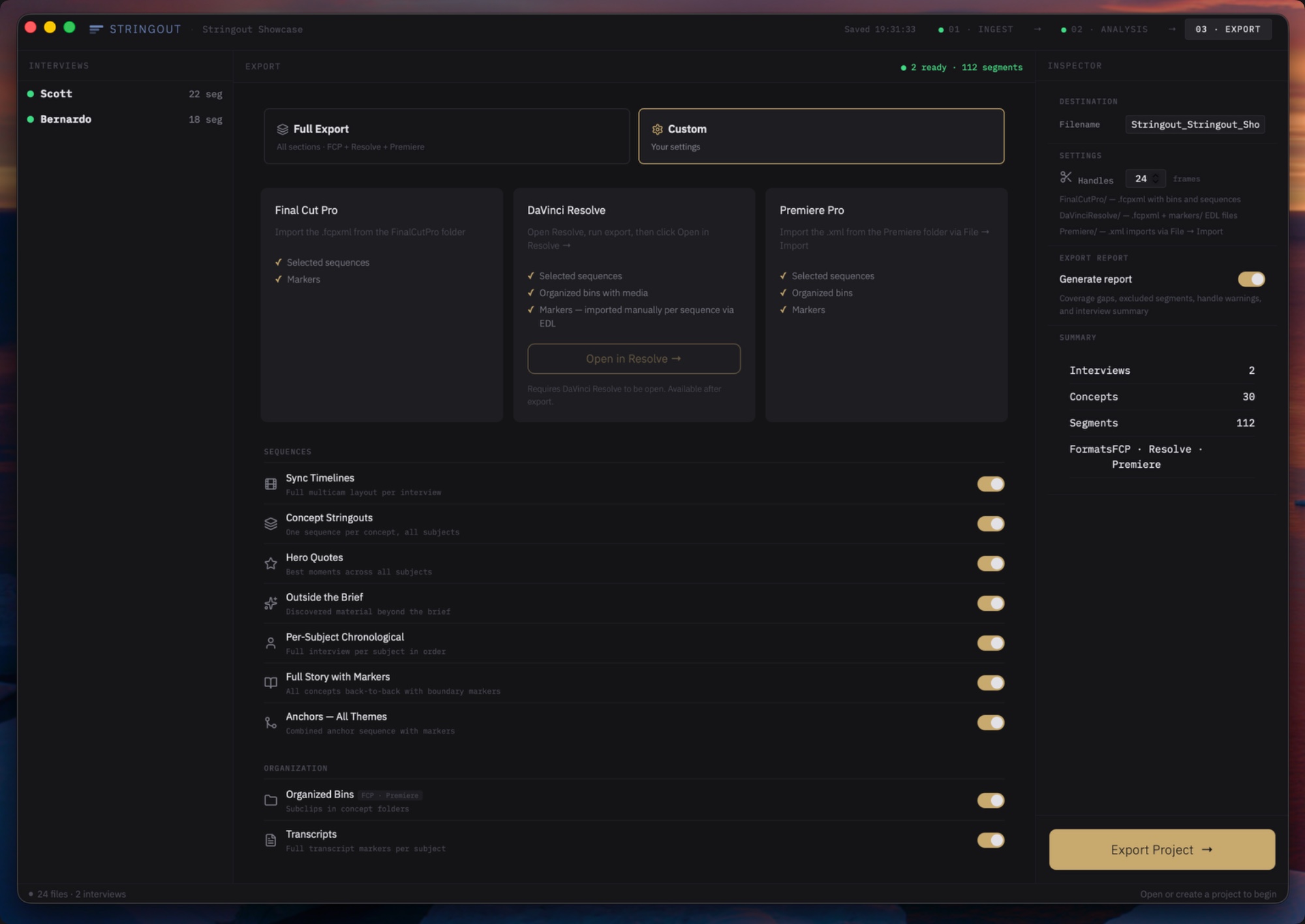
Rushes exports an organized, ready-to-cut project — structured bins, labeled sequences, and synced timelines — directly into Final Cut Pro, DaVinci Resolve, or Premiere Pro. You open it and you're already past the setup. The edit starts now.

  • Organized bins per concept, per subject
  • String-out sequences ready for editorial review
  • Full sync timelines per interview subject
  • Final Cut Pro, DaVinci Resolve, and Premiere Pro
Export tab — Final Cut Pro, DaVinci Resolve, Premiere Pro targets
Every AI editing tool wants to make decisions for you. Rushes doesn't. It moves your material into reach. You decide what the story is.
Nothing moves forward unverified

Every sync is confirmed before analysis runs. Every timecode checked. You know exactly what you're working with before a single clip reaches your timeline.

Your footage stays on your machine

Transcription is entirely local. When Rushes analyzes your interview for concepts and themes, only the transcript text is sent — no audio, no video, no frames. Your client's footage goes nowhere.

The editor decides everything

Concept cards are a starting point, not an answer. Drag, reorder, exclude, and override. The AI surfaces material. You shape the story.

Who it's for

Built for editors
who work with talking heads.

Documentary · Branded content

The director-editor working without an AE

You shot the interview. Now you need to cut it. Rushes is the assistant editor you don't have — sync, transcription, and organization handled before you open your NLE.

Corporate video · Interview editorial

The freelance editor who needs to move fast

You inherit the footage. Half the job is making sense of it before you can start. Rushes turns a folder of disorganized files into an organized, transcribed, ready-to-cut project.

Agency · Production company

Teams turning around interview content at volume

When you're cutting multiple interview projects simultaneously, setup time is overhead. Rushes compresses the pre-edit workflow so your editors spend time on the cut, not the prep.

Assistant editor · DIT

The AE or DIT delivering post-ready rushes

Skip the hours of syncing, labeling, and logging before the editor even sees the footage. Rushes hands you an organized, transcribed, analyzed project in minutes — a higher-value deliverable that lets you focus on the judgment calls only you can make.

Comparison

How Rushes Compares to Eddie AI, Selects, Wideframe, and Descript

Pricing and features verified from each company's public website, May 2026.

Most AI video tools were built for podcasters and content creators. They're designed to edit for you — to make creative decisions, propose story frameworks, and deliver a finished cut by morning. That's a different product for a different editor.

Rushes is built for the professional editor who doesn't want an AI making creative decisions. The story is yours. The judgment is yours. What you need is for the mechanical work — sync, ingest, transcription, organization — to be done accurately and completely before you sit down to cut. That's the job Rushes does. It's not an AI editor. It's an AI assistant that gets you to the story faster.

That distinction matters in every part of how Rushes is built. Transcription runs entirely on your machine — Rushes is the only tool in this category that transcribes locally. Your footage never leaves your drive. Sync adapts to the footage: Rushes reads embedded timecode when it's there, uses waveform analysis when it isn't, reports the method and confidence on every clip, and verifies before analysis runs. That holds across the range — a jam-synced multicam with a Sound Devices recorder and SMPTE timecode on sequential camera cards, and an iPhone with a separate voice memo. Audio-only sync degrades on long gaps, sequential multi-card cameras, and angles without usable scratch audio; Rushes flags those cases for review before they reach your timeline. And the output is a fully organized NLE project ready to open, not a rough cut someone else assembled.

Feature RushesAI ingest and organization for professional editors Eddie AIAI rough cut assistant Selects ProAI pre-edit tool for podcasts and long-form WideframeAI footage librarian and sequence assembler DescriptTranscript-based text editor for video
Price/year $249/year7 $2,004/year10 $480/year11 $1,200/year12 $288/year5
Footage to cloud Never Partial1 Partial2 Never Always
Sync verified before analysis runs
Multi-track field audio at ingest 13
NLE export FcPrDr FcPrDr3 FcPrDr FcPrDr FcPrDr6
One-click multi-sequence Resolve import 4
Persistent cross-subject story structure 9
Footage caps None 120 exports/yr 20 hrs/mo11 None 30 hrs/mo5
Structured B-roll logging 8
AI makes editorial decisions Never Yes Yes Yes Yes
  1. 1Eddie's desktop app processes locally. Night Shift — their overnight rough cut feature — sends footage to cloud servers for processing.
  2. 2Selects runs as a desktop app; its privacy policy names Google Cloud and AWS as service providers. Footage-processing locality is not publicly specified.
  3. 3Eddie's Resolve integration exports one timeline at a time. It cannot deliver a complete organized project — multiple timelines, bins, and stringouts — in a single export. Each timeline counts against the plan's annual export limit.
  4. 4Selects exports individual FCPXML timelines which must be imported into Resolve manually, one at a time. Rushes opens a new Resolve project and imports all sequences simultaneously with a single click.
  5. 5Descript Creator plan, billed annually at $24/month ($288/year). Includes 30 hours/month of media transcription — each camera angle on a multi-camera shoot counts as a separate file against this limit. Business plan available at $50/month ($600/year).
  6. 6Descript exports to Premiere Pro and Final Cut Pro via XML as a flat edited sequence — not an organized project with bins, sync timelines, and stringouts — and does not export to DaVinci Resolve at all.
  7. 7Rushes founding rate of $249/year is available exclusively to early access subscribers and is locked for life as long as the subscription remains active. Standard launch price is $399/year.
  8. 8Rushes is built exclusively for interview ingest and organization. B-roll selection and placement is editorial work — Rushes gets you to that stage faster, fully organized, with every interview subject transcribed and structured. B-roll remains in the editor's hands, where it belongs.
  9. 9Eddie can query across multiple interview subjects via natural language prompts and compile soundbites into a story arc. It does not produce a persistent organizational structure — concept cards, coverage mapping, draggable story order, and per-subject gap analysis — that exists before any prompt is given. Rushes analyzes all subjects simultaneously and surfaces the full cross-subject structure proactively.
  10. 10Eddie Pro tier ($167/month billed yearly). Higher tiers — Pro+ ($333/mo) and Ultra ($1,250/mo) — add larger project sizes and more exports.
  11. 11Selects Creator tier ($40/month billed yearly), the highest plan currently shipping. Selects' announced "Pro" tier (80 hr/mo, 10-track multicam) is listed as "Coming soon" on their pricing page.
  12. 12Wideframe is priced at $100/month; annualized for comparison. No annual discount published.
  13. 13Rushes reads multi-track audio from field recorders during sync, before any clip reaches the NLE. Eddie added multi-track audio support in January 2026 (currently in beta), but it runs through helper extensions inside Premiere Pro and DaVinci Resolve at the edit stage, not at ingest.
Sources

Stop prepping. Start cutting.

Early subscribers lock in $249/year — $150 off the eventual standard rate of $399.
FAQ

Questions.

No. Your audio and video never leave your machine. Transcription runs entirely locally. The only data that ever touches an external server is the transcript text — plain text, nothing else — which is sent to our AI analysis service to organize your material by concept. No frames, no audio, no media of any kind. Your client footage stays where it belongs.
Final Cut Pro, DaVinci Resolve, and Adobe Premiere Pro. Each gets its own optimized export file — organized bins, sequences, and markers — structured for how that NLE imports and displays them. Open the file, and your project is ready to cut.
Resolve's sync is a capable tool that requires user discipline — you set it up, run it, and evaluate the results yourself. Rushes' sync is a gated workflow with built-in verification. Every sync result is confirmed before anything advances. Confidence is reported. Problems are flagged with a specific resolution path. You never wonder if the sync is right.
No — Rushes is built specifically for interview-driven, talking-head work. Documentary A-roll, corporate video, branded content interviews. The transcript is the core material. Rushes doesn't handle b-roll, narrative shoots, or footage where the subject isn't speaking to camera. If that's what you need, this isn't the right tool.
Rushes requires macOS on Apple Silicon (M1 or later). Intel Macs are not supported. Transcription runs locally — a one-hour interview typically transcribes in minutes, not hours.
It's replacing the mechanical part of the AE role — the part that doesn't require editorial judgment. Sync, transcription, basic organization. The creative work — story structure, sequence order, what makes the cut — that's still yours. If you work with an AE, Rushes handles the prep so they can focus on the judgment calls that actually matter.
Rushes was built by a commercial director and editor with years of experience cutting documentary and high-end branded content. Every workflow decision was made by someone who has actually sat at a timeline with a deadline — not a product team guessing at editor pain points. Rushes exists because the tool didn't.
Rushes requires macOS 13 or later and an Apple Silicon Mac (M1 or newer). 8 GB RAM minimum, 16 GB recommended. Approximately 2 GB install size including the local transcription model. An internet connection is required for AI analysis — transcription runs fully offline.