Corporate · Branded
How to prep a multi-camera interview shoot for editing.
Find out what you were handed, get every camera onto the recorder’s clock and check it, transcribe from the mic that actually hears the words, and work out which parts of the brief got answered. Then open the edit with all of that already built, so the first hour of the session goes to the cut, not the cleanup.
I’ve cut interviews for political ads, for branded films with world-famous architects, interior designers and celebrities, and for a fry cook at a fast-food restaurant in the middle of nowhere. Some of those shoots came with jammed timecode on every camera. Some came as a couple of iPhone clips somebody handed me. I’ve hit every problem below, on my own shoots and on other people’s. The prep is the same job either way, and it has to be right before the creative part can start. I built Rushes because every shortcut I tried fell apart the moment the sync was a frame or two off, and nothing else checked it.
Get every camera onto one clock, and check it
Start by finding out who’s on the drive and which day they were shot. Don’t trust the file dates: a copy or a transcode rewrites them, and you’ll end up with Tuesday’s interview filed under Thursday.
Then sync. Most shoots are some mix of these:
- Jammed timecode. The easy one, until a generator wanders and a whole interview sits two frames off. You won’t see it. You’ll hear it in the mix.
- LTC on a camera’s audio channel. The timecode is there, it’s just recorded as sound.
- A recorder whose clock is minutes off. Nobody jammed it, or somebody changed a battery.
- A camera with no timecode at all. The phone, the B-cam someone brought, the clips you were handed.
- A camera with no usable audio. Nothing to match by ear, so the placement can’t be checked.
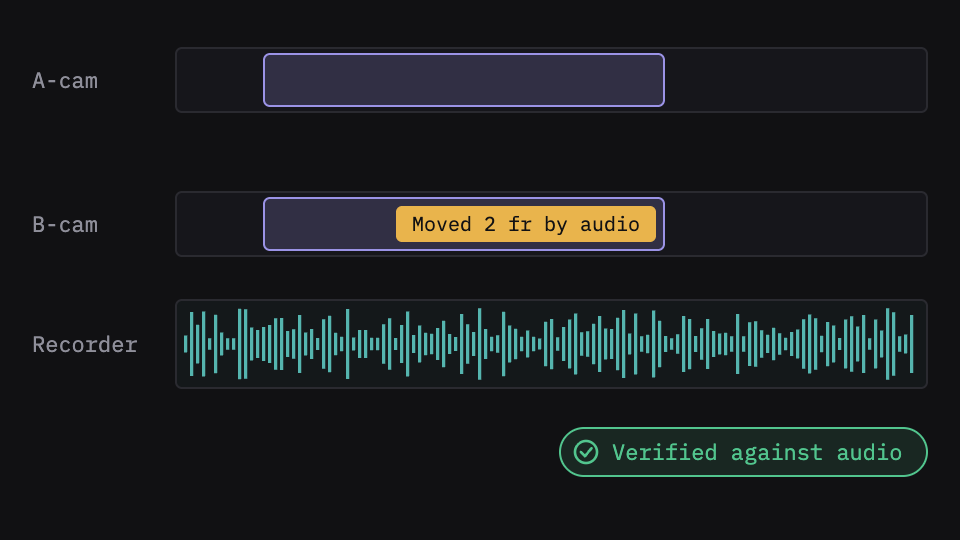
Whatever the mix, check the result instead of trusting it. You don’t need to watch everything: listen to the placements that look doubtful. Pan the reference to one ear and the clip to the other, and a two-frame error sounds like a slap.
What Rushes does here
Rushes groups the drive by subject and by day as it lands and shows where each day’s dates came from. You never pick a sync method: Rushes routes every file on its own. It decodes LTC on an audio channel, measures a recorder’s clock skew and widens the match to cover it, and matches cameras with no timecode by waveform. Then it measures every placement against the audio, including the ones that had timecode, and when the clock is wrong the audio wins. A yellow flag means Rushes has actual doubt, so you listen to minutes of footage instead of hours, with the split-ear listen tool built in.
Know what you’ve got before you start cutting
Transcribe from the mic that hears the words. Corporate shoots usually have a lav and a boom, and on some rolls one of them is the one you want. The camera’s scratch track is never it.
Keep the client’s footage where it is. A lot of corporate and agency work comes under an NDA, and uploading the footage to a cloud service to get a transcript is the kind of thing that ends a relationship.
Check the brief before you build anything. Put the questions you asked next to what people actually said. If something the client cares about never got a clean answer, you want to know now, not in the first review.
Clear the junk, but keep a list. Long pauses, “can we go again”, the producer talking between questions. None of it is going in the film, and none of it should vanish without a record.
What Rushes does here
Rushes transcribes on your Mac, from whichever recorder channel actually hears the words. Your footage and audio never leave the machine; the only thing that leaves is text, when you click Run. Type in the brief and your questions, and Rushes reads every interview at once: where people echo or contradict each other, and which question nobody answered. Every candidate soundbite is verbatim and cut to the frame of the words. Pauses over three seconds inside an answer are cut by default, listed in a report, and come back with one key. Longer crew talk is marked on the timeline, named with its length and its words.
Open the edit with the project already built
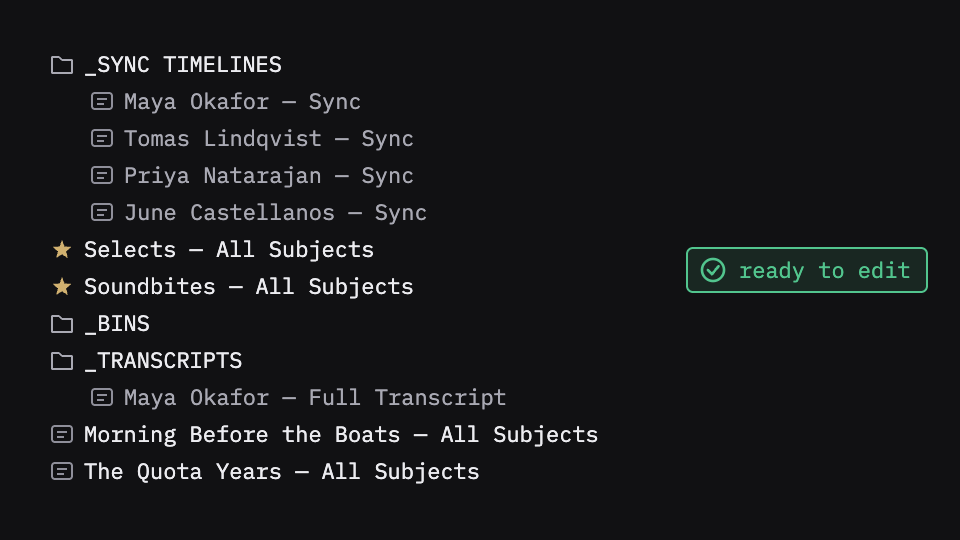
A good handoff means the first thing you do in the NLE is watch, not organize: one sync timeline per person, the selects and soundbites pulled, the transcripts beside them, the B-roll in bins, everything named so you can find it at the end of a long day.
What Rushes does here
Rushes exports all of that to Premiere Pro, Final Cut Pro or DaVinci Resolve: sync timelines, selects, soundbites, concept timelines, B-roll bins and transcripts, built, named and binned. The sync you approved is the sync your NLE opens.
What stays yours
Which answer lands, which take leads, what follows what. Rushes sorts and scores; it never picks the best take or decides the order. That’s the edit, and it’s yours.
Try it on your own footage
Rushes is free to try: drop your drive, sync and verify every angle, transcribe on your Mac and run the analysis, no card required. You pay when you export to your NLE.